









Save new RSS feed items to OneNote pages
Popular OneNote workflows & automations
-
 13.1k
13.1k
-
-
Save your handwritten notes to OneNote
6.82k
-
-
Save new iPhone screenshots to OneNote
4.86k
-
-
Create OneNote pages from new Evernote notes
3.27k
-
-
Save emailed notes to OneNote automatically
2.49k
-
-
Save new iOS Reminders to OneNote
2.18k
-
-
Save new YouTube uploads to OneNote
2.16k
-
-
Add new Note widget entries to OneNote
1.27k
-
-
Save your current location map to OneNote with a button press
1.12k
-









Create your own OneNote workflow
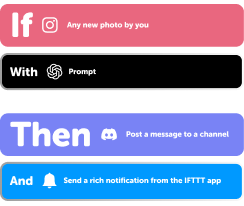
Create custom workflows effortlessly by selecting triggers, queries, and actions. With IFTTT, it's simple: “If this” trigger happens, “then that” action follows. Streamline tasks and save time with automated workflows that work for you.
3 triggers, queries, and actions
Create a page

Action
An action is the task your Applet carries out after the trigger occurs. It defines what happens as the result of your automation and completes the workflow.
This Action will create a new page in the specified section of the specified notebook.
Create a page with an image
Action
An action is the task your Applet carries out after the trigger occurs. It defines what happens as the result of your automation and completes the workflow.
This Action will create a new page with an image in the specified section of the specified notebook.
Create a page from a link
Action
An action is the task your Applet carries out after the trigger occurs. It defines what happens as the result of your automation and completes the workflow.
This Action creates a page from a link in the specified section of the specified notebook.
Create a page
Action
An action is the task your Applet carries out after the trigger occurs. It defines what happens as the result of your automation and completes the workflow.
This Action will create a new page in the specified section of the specified notebook.
Create a page with an image
Action
An action is the task your Applet carries out after the trigger occurs. It defines what happens as the result of your automation and completes the workflow.
This Action will create a new page with an image in the specified section of the specified notebook.
Create a page from a link
Action
An action is the task your Applet carries out after the trigger occurs. It defines what happens as the result of your automation and completes the workflow.
This Action creates a page from a link in the specified section of the specified notebook.
Automate OneNote from your AI assistant
Ask OpenClaw to create OneNote pages for you, right from your AI assistant, with IFTTT MCP.
Set up IFTTT MCP


Connect OneNote to these apps and more





























































































GET STARTED
How to connect to a OneNote automation
Find an Applet using OneNote and Camera widget
Find an automation to connect to, or create your own!Connect IFTTT to your accounts
Securely connect the Applet services to your respective accounts.Finalize and customize your Applet
Review trigger and action settings, and click connect. Simple as that!
USE CASE
Organize handwritten notes
If you prefer writing notes by hand, use the Camera Widget to scan and save them to OneNote for easy retrieval and organization.
Get startedMore credits, more OneNote Applets
-

More credits, more possibilities
Get more credits per month to power more automation activity. -
Power more advanced automations
Use credits to power your automations, including actions that require more processing. -

Access faster speeds and higher rate limits
Get faster updates and more actions with increased rate limits and more frequent checks.
You may also like


About OneNote
Microsoft OneNote is a digital notebook that provides a single place for all of your notes and information — everything you need to remember and manage in your life at home, at work, or at school.