










Log Android notifications to Google Sheets and weekly email
15 ready-made Android Device and Email Digest Applets
Turn one on, or build your own. Android Device can start an automation with "Connects or disconnects from a specific Bluetooth device", and IFTTT can then run "Add to daily email digest" on Email Digest.-
 37
37
-
-
Send Android notifications to a daily email digest
5
-
-
Email Android notifications when received
-
-
Send Android Signal notifications to Gmail and Email Digest
-
-
Add Android app notifications to Email Digest
-
-
Add Wi-Fi connection changes to daily email digest
-
-
Add disconnected Bluetooth devices to your weekly email digest
-
-
Add Wi-Fi disconnects to your daily email digest
-
-
Add Android WiFi disconnects to your daily email digest
-



Automate Android Device and Email Digest from your AI assistant
Tell OpenClaw to create Android Device applets that respond to your WiFi and Bluetooth connections, right from your AI assistant, with IFTTT MCP.
Set up IFTTT MCP


Create your own Android Device and Email Digest workflow
Create custom workflows effortlessly by selecting triggers, queries, and actions. With IFTTT, it's simple: “If this” trigger happens, “then that” action follows. Streamline tasks and save time with automated workflows that work for you.
24 triggers, queries, and actions
Connects or disconnects from a specific Bluetooth device
Polling trigger
Polling Applets run after IFTTT reaches out to the trigger service and finds a new trigger event. These trigger checks occur every 5 minutes for Pro and Pro+ users, and every hour for Free users.
This Trigger fires every time your Android device connects to or disconnects from a Bluetooth device you specify.
Connects or disconnects from a specific WiFi network
Polling trigger
Polling Applets run after IFTTT reaches out to the trigger service and finds a new trigger event. These trigger checks occur every 5 minutes for Pro and Pro+ users, and every hour for Free users.
This Trigger fires every time your Android device connects or disconnects from a WiFi network you specify.
Connects or disconnects from any Bluetooth device
Polling trigger
Polling Applets run after IFTTT reaches out to the trigger service and finds a new trigger event. These trigger checks occur every 5 minutes for Pro and Pro+ users, and every hour for Free users.
This Trigger fires every time your Android device connects to or disconnects from any Bluetooth device.
Connects or disconnects from any WiFi network
Polling trigger
Polling Applets run after IFTTT reaches out to the trigger service and finds a new trigger event. These trigger checks occur every 5 minutes for Pro and Pro+ users, and every hour for Free users.
This Trigger fires every time your Android device connects or disconnects from any WiFi network.
Connects to a specific Bluetooth device
Polling trigger
Polling Applets run after IFTTT reaches out to the trigger service and finds a new trigger event. These trigger checks occur every 5 minutes for Pro and Pro+ users, and every hour for Free users.
This Trigger fires every time your Android device connects to a Bluetooth device you specify.
Connects to a specific WiFi network
Polling trigger
Polling Applets run after IFTTT reaches out to the trigger service and finds a new trigger event. These trigger checks occur every 5 minutes for Pro and Pro+ users, and every hour for Free users.
This Trigger fires every time your Android device connects to a WiFi network you specify.
Connects to any Bluetooth device
Polling trigger
Polling Applets run after IFTTT reaches out to the trigger service and finds a new trigger event. These trigger checks occur every 5 minutes for Pro and Pro+ users, and every hour for Free users.
This Trigger fires every time your Android device connects to any Bluetooth device.
Connects to any WiFi network
Polling trigger
Polling Applets run after IFTTT reaches out to the trigger service and finds a new trigger event. These trigger checks occur every 5 minutes for Pro and Pro+ users, and every hour for Free users.
This Trigger fires every time your Android device connects to any WiFi network.
Disconnects from a specific Bluetooth device
Polling trigger
Polling Applets run after IFTTT reaches out to the trigger service and finds a new trigger event. These trigger checks occur every 5 minutes for Pro and Pro+ users, and every hour for Free users.
This Trigger fires every time your Android device disconnects from a Bluetooth you specify.
Disconnects from a specific WiFi network
Polling trigger
Polling Applets run after IFTTT reaches out to the trigger service and finds a new trigger event. These trigger checks occur every 5 minutes for Pro and Pro+ users, and every hour for Free users.
This Trigger fires every time your Android device disconnects from a WiFi network you specify.
Disconnects from any Bluetooth device
Polling trigger
Polling Applets run after IFTTT reaches out to the trigger service and finds a new trigger event. These trigger checks occur every 5 minutes for Pro and Pro+ users, and every hour for Free users.
This Trigger fires every time your Android device disconnects from any Bluetooth device.
Disconnects from any WiFi network
Polling trigger
Polling Applets run after IFTTT reaches out to the trigger service and finds a new trigger event. These trigger checks occur every 5 minutes for Pro and Pro+ users, and every hour for Free users.
This Trigger fires every time your Android device disconnects from any WiFi network.
Add to daily email digest

Action
An action is the task your Applet carries out after the trigger occurs. It defines what happens as the result of your automation and completes the workflow.
This Action will add an item to your daily digest sent once a day at the time you specify.
Add to weekly email digest
Action
An action is the task your Applet carries out after the trigger occurs. It defines what happens as the result of your automation and completes the workflow.
This Action will add an item to your weekly digest sent once a week on the day and time you specify.
Launch Google Maps Navigation
Action
An action is the task your Applet carries out after the trigger occurs. It defines what happens as the result of your automation and completes the workflow.
This Action will launch Google Maps Navigation on your Android device and begin turn-by-turn guidance to the destination you specify.
Mute ringtone
Action
An action is the task your Applet carries out after the trigger occurs. It defines what happens as the result of your automation and completes the workflow.
This action will mute your Android device's ringtone. If your device is already muted, it will remain muted.
Play a specific song
Action
An action is the task your Applet carries out after the trigger occurs. It defines what happens as the result of your automation and completes the workflow.
This Action will play a song you specify on your Android device. The music played depends on your device and setup. Depending on your version of Android, playback may not start automatically.
Play music
Action
An action is the task your Applet carries out after the trigger occurs. It defines what happens as the result of your automation and completes the workflow.
This Action will play music on your Android device. The music played depends on your device and setup. Depending on your version of Android, playback may not start automatically.
Set ringtone volume
Action
An action is the task your Applet carries out after the trigger occurs. It defines what happens as the result of your automation and completes the workflow.
This Action will set the ringtone volume of your Android device.
Turn off Do Not Disturb mode
Action
An action is the task your Applet carries out after the trigger occurs. It defines what happens as the result of your automation and completes the workflow.
Turn off Do Not Disturb mode on your Android Device
Turn on Do Not Disturb mode
Action
An action is the task your Applet carries out after the trigger occurs. It defines what happens as the result of your automation and completes the workflow.
Turn on Do Not Disturb mode on your Android Device.
Update device wallpaper
Action
An action is the task your Applet carries out after the trigger occurs. It defines what happens as the result of your automation and completes the workflow.
This Action will update the wallpaper on your Android device from the image URL you specify.
Add to daily email digest
Action
An action is the task your Applet carries out after the trigger occurs. It defines what happens as the result of your automation and completes the workflow.
This Action will add an item to your daily digest sent once a day at the time you specify.
Add to weekly email digest
Action
An action is the task your Applet carries out after the trigger occurs. It defines what happens as the result of your automation and completes the workflow.
This Action will add an item to your weekly digest sent once a week on the day and time you specify.
Connects or disconnects from a specific Bluetooth device
Polling trigger
Polling Applets run after IFTTT reaches out to the trigger service and finds a new trigger event. These trigger checks occur every 5 minutes for Pro and Pro+ users, and every hour for Free users.
This Trigger fires every time your Android device connects to or disconnects from a Bluetooth device you specify.
Connects or disconnects from a specific WiFi network
Polling trigger
Polling Applets run after IFTTT reaches out to the trigger service and finds a new trigger event. These trigger checks occur every 5 minutes for Pro and Pro+ users, and every hour for Free users.
This Trigger fires every time your Android device connects or disconnects from a WiFi network you specify.
Connects or disconnects from any Bluetooth device
Polling trigger
Polling Applets run after IFTTT reaches out to the trigger service and finds a new trigger event. These trigger checks occur every 5 minutes for Pro and Pro+ users, and every hour for Free users.
This Trigger fires every time your Android device connects to or disconnects from any Bluetooth device.
Connects or disconnects from any WiFi network
Polling trigger
Polling Applets run after IFTTT reaches out to the trigger service and finds a new trigger event. These trigger checks occur every 5 minutes for Pro and Pro+ users, and every hour for Free users.
This Trigger fires every time your Android device connects or disconnects from any WiFi network.
Connects to a specific Bluetooth device
Polling trigger
Polling Applets run after IFTTT reaches out to the trigger service and finds a new trigger event. These trigger checks occur every 5 minutes for Pro and Pro+ users, and every hour for Free users.
This Trigger fires every time your Android device connects to a Bluetooth device you specify.
Connects to a specific WiFi network
Polling trigger
Polling Applets run after IFTTT reaches out to the trigger service and finds a new trigger event. These trigger checks occur every 5 minutes for Pro and Pro+ users, and every hour for Free users.
This Trigger fires every time your Android device connects to a WiFi network you specify.
Connects to any Bluetooth device
Polling trigger
Polling Applets run after IFTTT reaches out to the trigger service and finds a new trigger event. These trigger checks occur every 5 minutes for Pro and Pro+ users, and every hour for Free users.
This Trigger fires every time your Android device connects to any Bluetooth device.
Connects to any WiFi network
Polling trigger
Polling Applets run after IFTTT reaches out to the trigger service and finds a new trigger event. These trigger checks occur every 5 minutes for Pro and Pro+ users, and every hour for Free users.
This Trigger fires every time your Android device connects to any WiFi network.
Disconnects from a specific Bluetooth device
Polling trigger
Polling Applets run after IFTTT reaches out to the trigger service and finds a new trigger event. These trigger checks occur every 5 minutes for Pro and Pro+ users, and every hour for Free users.
This Trigger fires every time your Android device disconnects from a Bluetooth you specify.
Disconnects from a specific WiFi network
Polling trigger
Polling Applets run after IFTTT reaches out to the trigger service and finds a new trigger event. These trigger checks occur every 5 minutes for Pro and Pro+ users, and every hour for Free users.
This Trigger fires every time your Android device disconnects from a WiFi network you specify.
Build an automation in seconds!
If

Select a trigger the automation will use
Connects or disconnects from a specific Bluetooth device
Connects or disconnects from a specific WiFi network
Connects or disconnects from any Bluetooth device
Connects or disconnects from any WiFi network
Connects to a specific Bluetooth device
Connects to a specific WiFi network
Connects to any Bluetooth device
Connects to any WiFi network
Disconnects from a specific Bluetooth device
Disconnects from a specific WiFi network
Disconnects from any Bluetooth device
Disconnects from any WiFi network
Notification received
Notification received from a specific app
Then

Select an action the automation will perform
Add to daily email digest
Add to weekly email digest
Launch Google Maps Navigation
Mute ringtone
Play a specific song
Play music
Set ringtone volume
Turn off Do Not Disturb mode
Turn on Do Not Disturb mode
Update device wallpaper
You can add delays, queries, and more actions in the chat.
GET STARTED
How to connect to a Android Device automation
Find an Applet using Android Device and Email Digest
Find an automation to connect to, or create your own!Connect IFTTT to your accounts
Securely connect the Applet services to your respective accounts.Finalize and customize your Applet
Review trigger and action settings, and click connect. Simple as that!Make more happen with your credits
-

More credits, more possibilities
Get more credits per month to power more automation activity. -
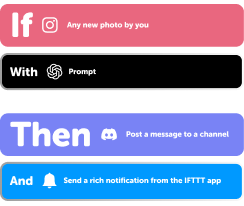
Power more advanced automations
Use credits to power your automations, including actions that require more processing. -

Access faster speeds and higher rate limits
Get faster updates and more actions with increased rate limits and more frequent checks.
Android Device and Email Digest tips, tools, and resources
-
Holiday
Six automations for a stronger start to 2026

-
Popular
What your automations say about your aesthetic

-
Productivity
6 calendar automations your week needs

-
Popular
How to connect your first Applet

-
Popular
Six ways to automate these annoying tasks

-
Holiday
Six productivity hacks that'll save you time in 2026
-
Popular
7 automations for people who hate mornings

-
Productivity
10 back-to-school automations to try

-
Lifestyle
Top widget Applets
More on Android Device and Email Digest
About Android Device
Android Device and IFTTT let you automate your phone based on your WiFi and Bluetooth connections, plus control your ringtone, music, and more.
About Email Digest
Email Digest and IFTTT let you automatically collect information into a custom daily or weekly email digest.