









Log Fitbit sleep data to Google Sheets
Other popular Fitbit workflows and automations
-
 15k
15k
-
-
Add a Google Calendar reminder when Fitbit logs low sleep
5.04k
-
-
Log Fitbit daily summary to Dropbox CSV
274
-
-
Automatically sync your sleep readings from Fitbit
32.2k
-
-
Send an Android SMS when Fitbit goal is reached
184
-
-
Get Fitbit daily summary notification
355
-
-
Get an IFTTT notification when your Fitbit goal isn’t met
4.23k
-
-
Log Fitbit step goal as workout in iOS Health
965
-
-
Turn on Philips Hue lights when Fitbit logs new sleep
2.21k
-







Automate Fitbit and FuseBase (Formerly Nimbus Note) from your AI assistant
Have Claude, ChatGPT, or Cursor build and run Fitbit and FuseBase (Formerly Nimbus Note) automations for you, like “Log Fitbit sleep data to Google Sheets”, with IFTTT MCP.
Set up IFTTT MCP


Create your own Fitbit and FuseBase (Formerly Nimbus Note) workflow
Create custom workflows effortlessly by selecting triggers, queries, and actions. With IFTTT, it's simple: “If this” trigger happens, “then that” action follows. Streamline tasks and save time with automated workflows that work for you.
24 triggers, queries, and actions
Daily activity summary
Polling trigger
Polling Applets run after IFTTT reaches out to the trigger service and finds a new trigger event. These trigger checks occur every 5 minutes for Pro and Pro+ users, and every hour for Free users.
This Trigger fires every time your Fitbit tracker syncs for the first time today and your previous day's stats are available.
Daily calorie burn goal achieved
Polling trigger
Polling Applets run after IFTTT reaches out to the trigger service and finds a new trigger event. These trigger checks occur every 5 minutes for Pro and Pro+ users, and every hour for Free users.
This Trigger fires when you achieve your daily calorie burn goal.
Daily distance goal achieved
Polling trigger
Polling Applets run after IFTTT reaches out to the trigger service and finds a new trigger event. These trigger checks occur every 5 minutes for Pro and Pro+ users, and every hour for Free users.
This Trigger fires every time you achieve your daily distance goal.
Daily floors climbed goal achieved
Polling trigger
Polling Applets run after IFTTT reaches out to the trigger service and finds a new trigger event. These trigger checks occur every 5 minutes for Pro and Pro+ users, and every hour for Free users.
This Trigger fires every time you achieve your daily floors climbed goal. NOTE: only available for Fitbit Ultra and One.
Daily goal not achieved by __:__
Polling trigger
Polling Applets run after IFTTT reaches out to the trigger service and finds a new trigger event. These trigger checks occur every 5 minutes for Pro and Pro+ users, and every hour for Free users.
This Trigger fires every time you do not achieve a daily goal you choose at the time you specify. NOTE: Updated on the first Fitbit tracker sync after the time you specify.
Daily step goal achieved
Polling trigger
Polling Applets run after IFTTT reaches out to the trigger service and finds a new trigger event. These trigger checks occur every 5 minutes for Pro and Pro+ users, and every hour for Free users.
This Trigger fires every time you achieve your daily step goal.
Daily very active minutes goal achieved
Polling trigger
Polling Applets run after IFTTT reaches out to the trigger service and finds a new trigger event. These trigger checks occur every 5 minutes for Pro and Pro+ users, and every hour for Free users.
This Trigger fires every time you achieve your daily very active minutes goal.
New sleep logged
Polling trigger
Polling Applets run after IFTTT reaches out to the trigger service and finds a new trigger event. These trigger checks occur every 5 minutes for Pro and Pro+ users, and every hour for Free users.
This Trigger fires every time your Fitbit logs new sleep.
New weight logged
Polling trigger
Polling Applets run after IFTTT reaches out to the trigger service and finds a new trigger event. These trigger checks occur every 5 minutes for Pro and Pro+ users, and every hour for Free users.
This Trigger fires every time you log your weight in the Fitbit app or with the Aria scale.
Sleep duration above
Polling trigger
Polling Applets run after IFTTT reaches out to the trigger service and finds a new trigger event. These trigger checks occur every 5 minutes for Pro and Pro+ users, and every hour for Free users.
This Trigger fires every time you log sleep above the target hours you specify.
Sleep duration below
Polling trigger
Polling Applets run after IFTTT reaches out to the trigger service and finds a new trigger event. These trigger checks occur every 5 minutes for Pro and Pro+ users, and every hour for Free users.
This Trigger fires every time you log sleep below the target hours you specify.
History of achieved very active minutes goals

Query
A query lets your Applet retrieve extra data that isn't included in the trigger, so that your automation can include more complete or useful information.
This query returns a list of events when you achieved your very active minute goals.
History of Daily Activity Summaries
Query
A query lets your Applet retrieve extra data that isn't included in the trigger, so that your automation can include more complete or useful information.
This query returns a list of Daily Activity Summary events from your Fitbit.
History of daily calorie burn goal achieved
Query
A query lets your Applet retrieve extra data that isn't included in the trigger, so that your automation can include more complete or useful information.
This query returns a list of when you achieve your daily calorie burn goal.
History of daily floors climbed goal achieved
Query
A query lets your Applet retrieve extra data that isn't included in the trigger, so that your automation can include more complete or useful information.
This query returns a list of when you achieve your daily floors climbed goal. NOTE: only available for Fitbit Ultra and One.
History of daily goal not being achieved by __:__
Query
A query lets your Applet retrieve extra data that isn't included in the trigger, so that your automation can include more complete or useful information.
This query returns a list of when you did not achieve a daily goal you chose by the time you specified. NOTE: Updated on the first Fitbit tracker sync after the time you specified.
History of daily step goal achieved
Query
A query lets your Applet retrieve extra data that isn't included in the trigger, so that your automation can include more complete or useful information.
This query returns a list of when you achieve your daily step goal.
History of Sleep duration above threshold
Query
A query lets your Applet retrieve extra data that isn't included in the trigger, so that your automation can include more complete or useful information.
This query returns a list of events when you logged sleep above the target hours you specified. Note: this query will only return future events after this Applet is created.
History of sleep duration below
Query
A query lets your Applet retrieve extra data that isn't included in the trigger, so that your automation can include more complete or useful information.
This query returns a list of when you log sleep below the target hours you specify. Note: this query will only return future events after this Applet is created.
History of sleep logged
Query
A query lets your Applet retrieve extra data that isn't included in the trigger, so that your automation can include more complete or useful information.
This query returns a list of when your Fitbit logs new sleep.
History of weight logged
Query
A query lets your Applet retrieve extra data that isn't included in the trigger, so that your automation can include more complete or useful information.
This query returns a list of when you logged your weight in the Fitbit app or with the Aria scale.
History of when the daily distance goal was achieved
Query
A query lets your Applet retrieve extra data that isn't included in the trigger, so that your automation can include more complete or useful information.
This query returns a list of when you have achieved your daily distance goal.
Create note
Action
An action is the task your Applet carries out after the trigger occurs. It defines what happens as the result of your automation and completes the workflow.
This Action will create a new text note in a folder with tags you specify.
Log your weight
Action
An action is the task your Applet carries out after the trigger occurs. It defines what happens as the result of your automation and completes the workflow.
This Action will log a new weight measurement to Fitbit.
Create note
Action
An action is the task your Applet carries out after the trigger occurs. It defines what happens as the result of your automation and completes the workflow.
This Action will create a new text note in a folder with tags you specify.
Daily activity summary
Polling trigger
Polling Applets run after IFTTT reaches out to the trigger service and finds a new trigger event. These trigger checks occur every 5 minutes for Pro and Pro+ users, and every hour for Free users.
This Trigger fires every time your Fitbit tracker syncs for the first time today and your previous day's stats are available.
Daily calorie burn goal achieved
Polling trigger
Polling Applets run after IFTTT reaches out to the trigger service and finds a new trigger event. These trigger checks occur every 5 minutes for Pro and Pro+ users, and every hour for Free users.
This Trigger fires when you achieve your daily calorie burn goal.
Daily distance goal achieved
Polling trigger
Polling Applets run after IFTTT reaches out to the trigger service and finds a new trigger event. These trigger checks occur every 5 minutes for Pro and Pro+ users, and every hour for Free users.
This Trigger fires every time you achieve your daily distance goal.
Daily floors climbed goal achieved
Polling trigger
Polling Applets run after IFTTT reaches out to the trigger service and finds a new trigger event. These trigger checks occur every 5 minutes for Pro and Pro+ users, and every hour for Free users.
This Trigger fires every time you achieve your daily floors climbed goal. NOTE: only available for Fitbit Ultra and One.
Daily goal not achieved by __:__
Polling trigger
Polling Applets run after IFTTT reaches out to the trigger service and finds a new trigger event. These trigger checks occur every 5 minutes for Pro and Pro+ users, and every hour for Free users.
This Trigger fires every time you do not achieve a daily goal you choose at the time you specify. NOTE: Updated on the first Fitbit tracker sync after the time you specify.
Daily step goal achieved
Polling trigger
Polling Applets run after IFTTT reaches out to the trigger service and finds a new trigger event. These trigger checks occur every 5 minutes for Pro and Pro+ users, and every hour for Free users.
This Trigger fires every time you achieve your daily step goal.
Daily very active minutes goal achieved
Polling trigger
Polling Applets run after IFTTT reaches out to the trigger service and finds a new trigger event. These trigger checks occur every 5 minutes for Pro and Pro+ users, and every hour for Free users.
This Trigger fires every time you achieve your daily very active minutes goal.
History of achieved very active minutes goals
Query
A query lets your Applet retrieve extra data that isn't included in the trigger, so that your automation can include more complete or useful information.
This query returns a list of events when you achieved your very active minute goals.
History of Daily Activity Summaries
Query
A query lets your Applet retrieve extra data that isn't included in the trigger, so that your automation can include more complete or useful information.
This query returns a list of Daily Activity Summary events from your Fitbit.
History of daily calorie burn goal achieved
Query
A query lets your Applet retrieve extra data that isn't included in the trigger, so that your automation can include more complete or useful information.
This query returns a list of when you achieve your daily calorie burn goal.
History of daily floors climbed goal achieved
Query
A query lets your Applet retrieve extra data that isn't included in the trigger, so that your automation can include more complete or useful information.
This query returns a list of when you achieve your daily floors climbed goal. NOTE: only available for Fitbit Ultra and One.
Build an automation in seconds!
If

Select a trigger the automation will use
Daily activity summary
Daily calorie burn goal achieved
Daily distance goal achieved
Daily floors climbed goal achieved
Daily goal not achieved by __:__
Daily step goal achieved
Daily very active minutes goal achieved
New sleep logged
New weight logged
Sleep duration above
Sleep duration below
Then

Select an action the automation will perform
Create note
Log your weight
You can add delays, queries, and more actions in the next step!
GET STARTED
How to connect to a Fitbit automation
Find an Applet using Fitbit and FuseBase (Formerly Nimbus Note)
Find an automation to connect to, or create your own!Connect IFTTT to your accounts
Securely connect the Applet services to your respective accounts.Finalize and customize your Applet
Review trigger and action settings, and click connect. Simple as that!Upgrade your automations with
-

Connect to more Applets
Connect up to 20 automations with Pro, and unlimited automations with Pro+ -
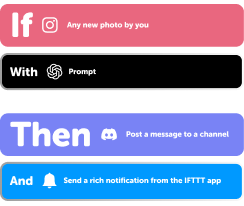
Add multiple actions with exclusive services
Add real-time data and multiple actions for smarter automations -

Get access to faster speeds
Get faster updates and more actions with higher rate limits and quicker checks
Fitbit and FuseBase (Formerly Nimbus Note) tips, tools, and resources
More on Fitbit and FuseBase (Formerly Nimbus Note)
About Fitbit
Fitbit designs products to track everyday health and fitness, empowering and inspiring people to lead healthier, more active lives. Turn on Applets to track your fitness and sleep goals, build healthier habits, and sync your fitness data to hundreds of other services.
About FuseBase (Formerly Nimbus Note)
FuseBase will make sure you never forget or lose valuable information ever again! Create and edit notes, save web pages, customize screenshots — and instantly share them with your friends and coworkers. Your important information follows you everywhere you go for instant access anytime, anywhere.