

Show on your LaMetric Time the last track you listened to on Spotify.
Other popular LaMetric workflows and automations
-
 4
4
-
-
Blink Philips Hue lights and alert on LaMetric when CO2 is high
16
-
-
Show Ring motion alerts on LaMetric
2
-
-
Update LaMetric display for new tweets from a specific user
1
-
-
Show LaMetric alert when someone leaves an area
91
-
-
Show Muslim prayer time alerts on LaMetric
5
-
-
Show QNAP system alerts on LaMetric
24
-
-
Show SmartThings motion alerts on LaMetric display
-
-
-

-

-

- 1+
Post updates and send alerts when the weather changes to snow -








Automate LaMetric and Microsoft Outlook from your AI assistant
Ask Copilot to create LaMetric applets for you, right from your AI assistant, with IFTTT MCP.
Set up IFTTT MCP


Create your own LaMetric and Microsoft Outlook workflow
Create custom workflows effortlessly by selecting triggers, queries, and actions. With IFTTT, it's simple: “If this” trigger happens, “then that” action follows. Streamline tasks and save time with automated workflows that work for you.
25 triggers, queries, and actions
Action Button Pressed
Polling trigger
Polling Applets run after IFTTT reaches out to the trigger service and finds a new trigger event. These trigger checks occur every 5 minutes for Pro and Pro+ users, and every hour for Free users.
This Trigger fires every time you press the action button on LaMetric Time.
Alarm Went Off
Polling trigger
Polling Applets run after IFTTT reaches out to the trigger service and finds a new trigger event. These trigger checks occur every 5 minutes for Pro and Pro+ users, and every hour for Free users.
This trigger fires an event when the LaMetric Clock app fires an alarm.
New message received
Polling trigger
Polling Applets run after IFTTT reaches out to the trigger service and finds a new trigger event. These trigger checks occur every 5 minutes for Pro and Pro+ users, and every hour for Free users.
This Trigger fires every time a new message is received in your Outlook inbox.
Timer Finished
Polling trigger
Polling Applets run after IFTTT reaches out to the trigger service and finds a new trigger event. These trigger checks occur every 5 minutes for Pro and Pro+ users, and every hour for Free users.
This trigger fires an event when countdown is finished.
Timer Started
Polling trigger
Polling Applets run after IFTTT reaches out to the trigger service and finds a new trigger event. These trigger checks occur every 5 minutes for Pro and Pro+ users, and every hour for Free users.
This trigger fires when timer app starts countdown on your LaMetric device.
History of timer finished

Query
A query lets your Applet retrieve extra data that isn't included in the trigger, so that your automation can include more complete or useful information.
This query returns a list of an event when countdown was finished.
Activate App Or Effect
Action
An action is the task your Applet carries out after the trigger occurs. It defines what happens as the result of your automation and completes the workflow.
This action will activate specific app or effect on a LaMetric device.
Create a draft message
Action
An action is the task your Applet carries out after the trigger occurs. It defines what happens as the result of your automation and completes the workflow.
This Action will create a draft message in your Outlook account without sending it.
Dim LaMetric SKY
Action
An action is the task your Applet carries out after the trigger occurs. It defines what happens as the result of your automation and completes the workflow.
This action will dim your LaMetric SKY.
Display Notification
Action
An action is the task your Applet carries out after the trigger occurs. It defines what happens as the result of your automation and completes the workflow.
This action will display notification on your LaMetric device.
Display Sticky Notification
Action
An action is the task your Applet carries out after the trigger occurs. It defines what happens as the result of your automation and completes the workflow.
This action will display notification on your LaMetric device. The notification will stay on screen until dismissed.
Pause Stopwatch
Action
An action is the task your Applet carries out after the trigger occurs. It defines what happens as the result of your automation and completes the workflow.
This action will pause stopwatch on a LaMetric Time device.
Pause Timer
Action
An action is the task your Applet carries out after the trigger occurs. It defines what happens as the result of your automation and completes the workflow.
This action will pause the timer on a LaMetric device.
Reset Stopwatch
Action
An action is the task your Applet carries out after the trigger occurs. It defines what happens as the result of your automation and completes the workflow.
This action will reset stopwatch on a LaMetric device.
Reset Timer
Action
An action is the task your Applet carries out after the trigger occurs. It defines what happens as the result of your automation and completes the workflow.
This action will reset the timer on a LaMetric device.
Send a message
Action
An action is the task your Applet carries out after the trigger occurs. It defines what happens as the result of your automation and completes the workflow.
This Action will send a message from your Outlook account.
Set Clock Face
Action
An action is the task your Applet carries out after the trigger occurs. It defines what happens as the result of your automation and completes the workflow.
This action will set or update a clock face on your LaMetric device.
Set Color On LaMetric SKY
Action
An action is the task your Applet carries out after the trigger occurs. It defines what happens as the result of your automation and completes the workflow.
This action will set color on your LaMetric SKY.
Action Button Pressed
Polling trigger
Polling Applets run after IFTTT reaches out to the trigger service and finds a new trigger event. These trigger checks occur every 5 minutes for Pro and Pro+ users, and every hour for Free users.
This Trigger fires every time you press the action button on LaMetric Time.
Activate App Or Effect
Action
An action is the task your Applet carries out after the trigger occurs. It defines what happens as the result of your automation and completes the workflow.
This action will activate specific app or effect on a LaMetric device.
Alarm Went Off
Polling trigger
Polling Applets run after IFTTT reaches out to the trigger service and finds a new trigger event. These trigger checks occur every 5 minutes for Pro and Pro+ users, and every hour for Free users.
This trigger fires an event when the LaMetric Clock app fires an alarm.
Create a draft message
Action
An action is the task your Applet carries out after the trigger occurs. It defines what happens as the result of your automation and completes the workflow.
This Action will create a draft message in your Outlook account without sending it.
Dim LaMetric SKY
Action
An action is the task your Applet carries out after the trigger occurs. It defines what happens as the result of your automation and completes the workflow.
This action will dim your LaMetric SKY.
Display Notification
Action
An action is the task your Applet carries out after the trigger occurs. It defines what happens as the result of your automation and completes the workflow.
This action will display notification on your LaMetric device.
Display Sticky Notification
Action
An action is the task your Applet carries out after the trigger occurs. It defines what happens as the result of your automation and completes the workflow.
This action will display notification on your LaMetric device. The notification will stay on screen until dismissed.
History of timer finished
Query
A query lets your Applet retrieve extra data that isn't included in the trigger, so that your automation can include more complete or useful information.
This query returns a list of an event when countdown was finished.
New message received
Polling trigger
Polling Applets run after IFTTT reaches out to the trigger service and finds a new trigger event. These trigger checks occur every 5 minutes for Pro and Pro+ users, and every hour for Free users.
This Trigger fires every time a new message is received in your Outlook inbox.
Pause Stopwatch
Action
An action is the task your Applet carries out after the trigger occurs. It defines what happens as the result of your automation and completes the workflow.
This action will pause stopwatch on a LaMetric Time device.
Pause Timer
Action
An action is the task your Applet carries out after the trigger occurs. It defines what happens as the result of your automation and completes the workflow.
This action will pause the timer on a LaMetric device.
Reset Stopwatch
Action
An action is the task your Applet carries out after the trigger occurs. It defines what happens as the result of your automation and completes the workflow.
This action will reset stopwatch on a LaMetric device.
Build an automation in seconds!
If

Select a trigger the automation will use
Action Button Pressed
Alarm Went Off
 New message received
Timer Finished
Timer Started
New message received
Timer Finished
Timer Started
Then
Select an action the automation will perform
Activate App Or Effect
Create a draft message
Dim LaMetric SKY
Display Notification
Display Sticky Notification
Pause Stopwatch
Pause Timer
Reset Stopwatch
Reset Timer
Send a message
Set Clock Face
Set Color On LaMetric SKY
Start Radio
Start Stopwatch
Start Timer
Stop Radio
Turn Off LaMetric SKY
Turn On LaMetric SKY
Update Indicator App
You can add delays, queries, and more actions in the next step!
GET STARTED
How to connect to a LaMetric automation
Find an Applet using LaMetric and Microsoft Outlook
Find an automation to connect to, or create your own!Connect IFTTT to your accounts
Securely connect the Applet services to your respective accounts.Finalize and customize your Applet
Review trigger and action settings, and click connect. Simple as that!Upgrade your automations with
-

Connect to more Applets
Connect up to 20 automations with Pro, and unlimited automations with Pro+ -
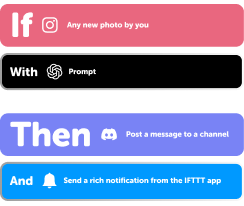
Add multiple actions with exclusive services
Add real-time data and multiple actions for smarter automations -

Get access to faster speeds
Get faster updates and more actions with higher rate limits and quicker checks
More on LaMetric and Microsoft Outlook
About LaMetric
LaMetric and IFTTT let you trigger actions on your smart display and lighting when timers go off, alarms sound, or you press a button.
About Microsoft Outlook
Outlook and IFTTT let you automatically draft and send emails based on incoming messages from other apps and services.